Product News
CREMA’s Reviews Widget for Shopify, Fully Redesigned: AI Sorting, Smart Filters, and a Trendier Review Experience

Merchandising your product well is only half the job. How you display your reviews is the other half — because no matter how many reviews you’ve collected, they stop persuading the moment a shopper can’t find the one that answers their question.
Think about what changes when the experience is right. High-quality photo and video reviews open up big and confident on the page. AI pushes the reviews most likely to convert to the top automatically. No paging through dozens of entries — the reviews that matter are already lined up.
That’s what we rebuilt the Reviews Widget for. It’s CREMA’s flagship display widget on Shopify — the one that gathers every text, photo, and video review for a product into one place on your product detail page — and it’s now trendier, smarter, and considerably easier for shoppers to navigate.
✍🏻 Key takeaways
The Reviews Widget has been redesigned across four areas: UI/UX, AI, filtering, and merchant-side configurability.
AI Recommended sorting analyzes review length, media attachments, and positive keywords to surface the reviews most likely to drive a purchase — no manual curation required.
AI keyword filters now sit as tappable tags at the top of the widget, and matching sentences are highlighted inside each review.
New product option filters (color, size) let shoppers narrow to reviews for the exact option combination they're considering.
Every new element — filters, search bar, ‘Photo/Video first’ button — can be switched on or off individually from the CREMA admin. No code, no theme edits.

What changed in the redesigned Reviews Widget?
Area | What’s new |
|---|---|
UI | Vertical style photo & video gallery, expanded brand color customization |
UX | ‘Write a review’ button moved to the top, reward notice surfaced automatically, custom question rating graph (Coming soon) |
AI | AI Recommended sorting, AI analyzed keywords, AI keyword filters, AI Review Summary |
Filtering | Reviews by product option |
Settings | Individual on/off toggles for every filter and search element |
1. A trendier UI that makes review content the hero
📌 Photo and video reviews, displayed the way shoppers already browse
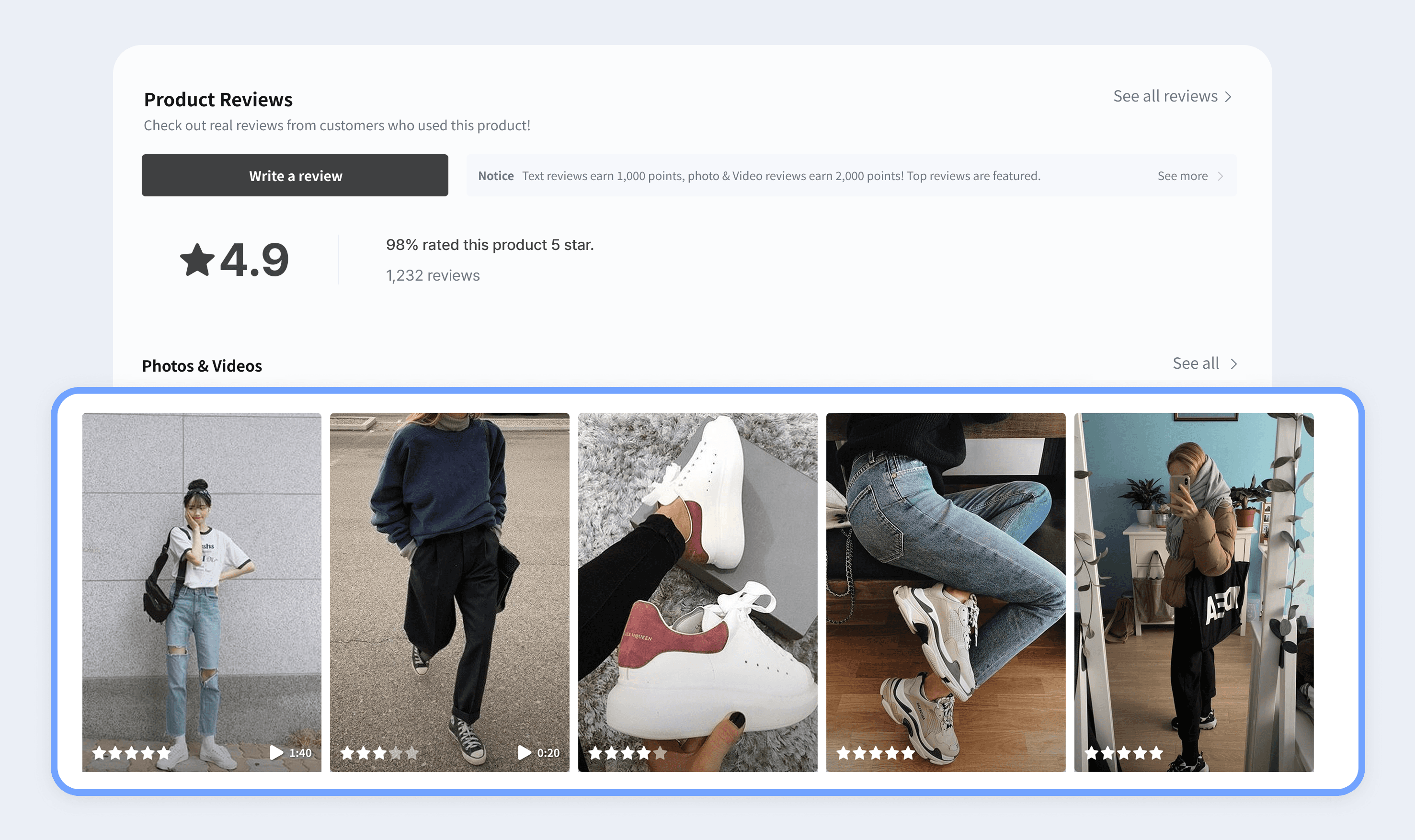
One of the core goals of this redesign was simple: make review content look as good as it deserves to. The clearest example is the new Vertical style for the photo & video gallery inside the Reviews Widget.
Vertical style renders review thumbnails large and vertical, pulling the eye toward the content instead of past it. For shoppers who spend their days in Instagram and TikTok feeds, a vertical layout is the browsing pattern they already know — so engagement feels natural rather than effortful. (The original square-thumbnail Basic style is still available if it suits your store better.)
📌 Brand color customization, extended to the details
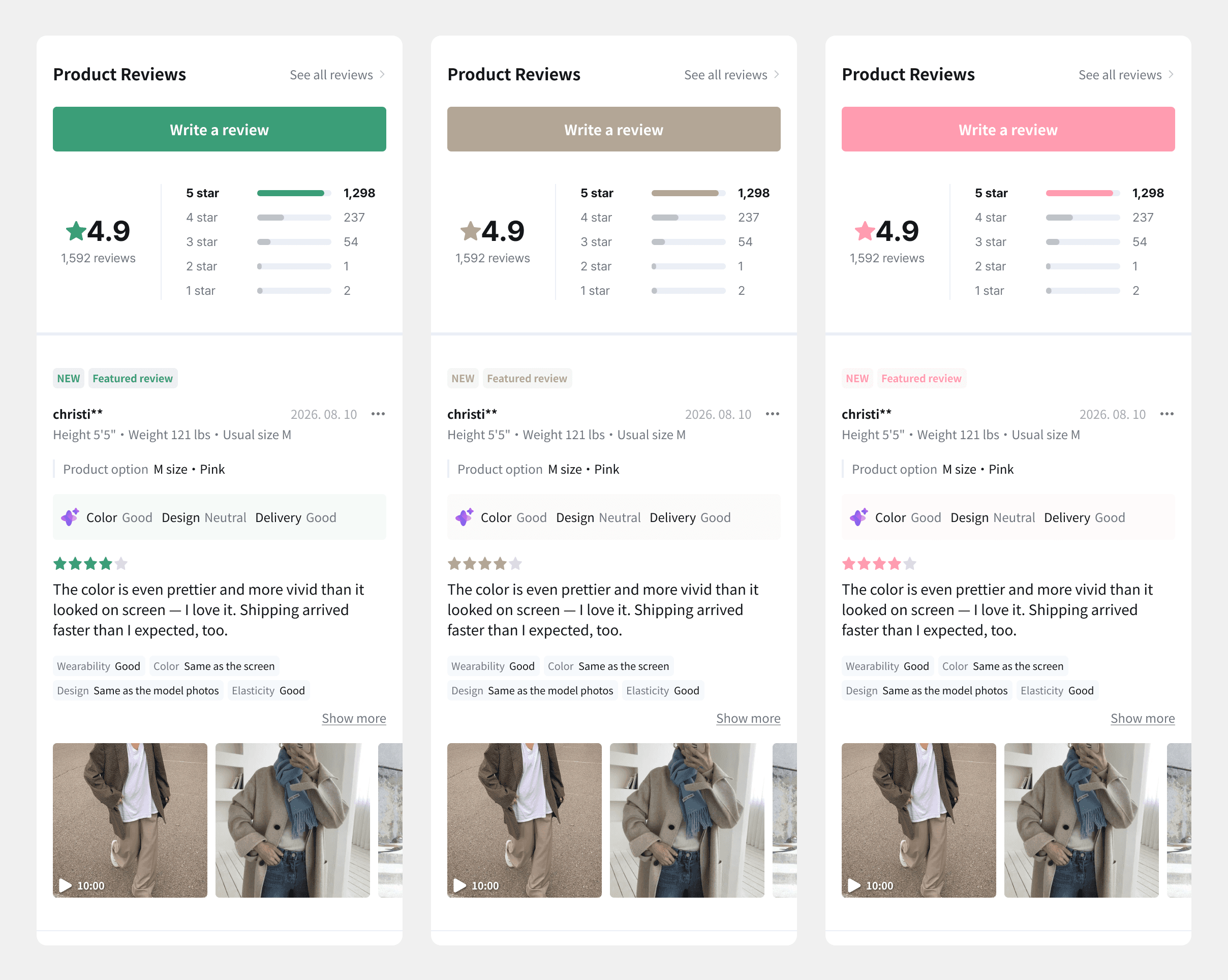
Star ratings and graphs inside the Reviews Widget were already color-customizable to match your store’s look. With this release, customization extends to the finer areas too — including the AI Review Summary block and the AI keyword filters.
The practical benefit: your reviews section stops looking like a third-party plugin bolted onto your theme, and starts looking like part of your storefront. On Shopify, where theme consistency is a real conversion factor, that matters more than it sounds.
📌 A smoother path from browsing to writing
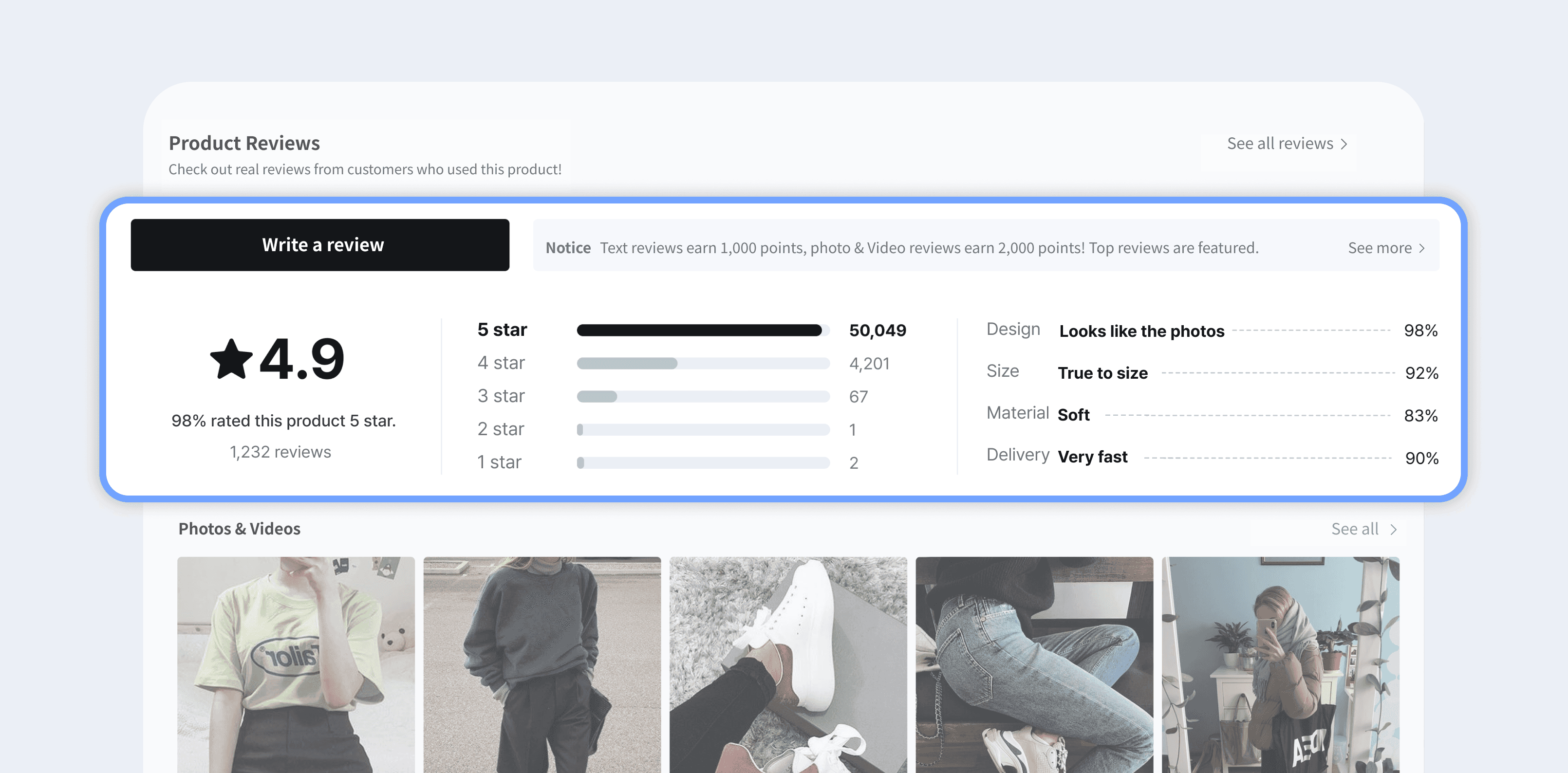
A new Custom Question Rating Graph will visualize the secondary attributes shoppers rate when they submit a review — things like "Design — true to the product photos" or "Delivery — arrived very quickly." Today the widget graphs overall satisfaction; with this update, the distribution of responses across each attribute becomes visible at a glance, so shoppers can read a product's characteristics without opening a single review. Coming soon.
Beyond that, we reordered the writing flow itself: the [Write a review] button now sits at the top of the widget, and your default reward notice appears automatically in the notice area. Small changes, but they compound — shoppers browsing your store hit fewer small frictions on the way to leaving a review.
2. Smarter AI that surfaces the reviews that actually convert
This redesign moves the Reviews Widget past simply showing reviews. AI now decides which reviews are worth a shopper’s attention first, and compresses the long ones down to their point.
📌 AI Recommended sorting: put your most persuasive reviews first
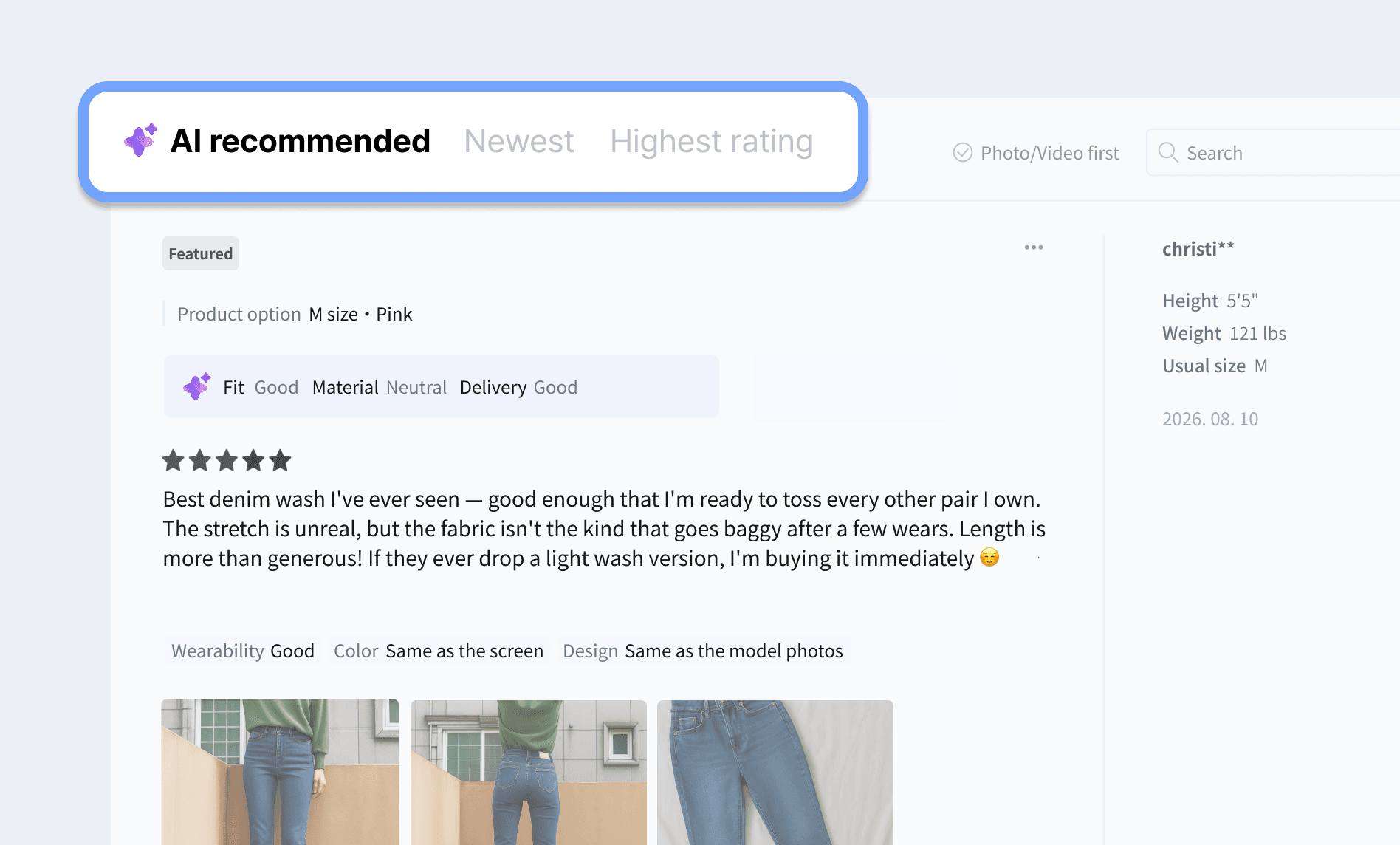
The old “Featured” sort order has been upgraded into AI Recommended. Instead of a fixed rule, AI weighs multiple signals — review length, whether photos or videos are attached, positive keyword density, and more — and automatically lifts the reviews most likely to help a shopper decide.
Hand-picking reviews per product isn’t realistic once you’re past a few dozen SKUs. Selecting AI Recommended does it for you, continuously. You can set AI Recommended as the default sort order — alongside Newest and Highest rating — from Widget Settings in the CREMA admin.
📌 AI keywords and rating tags: the gist, before the reading
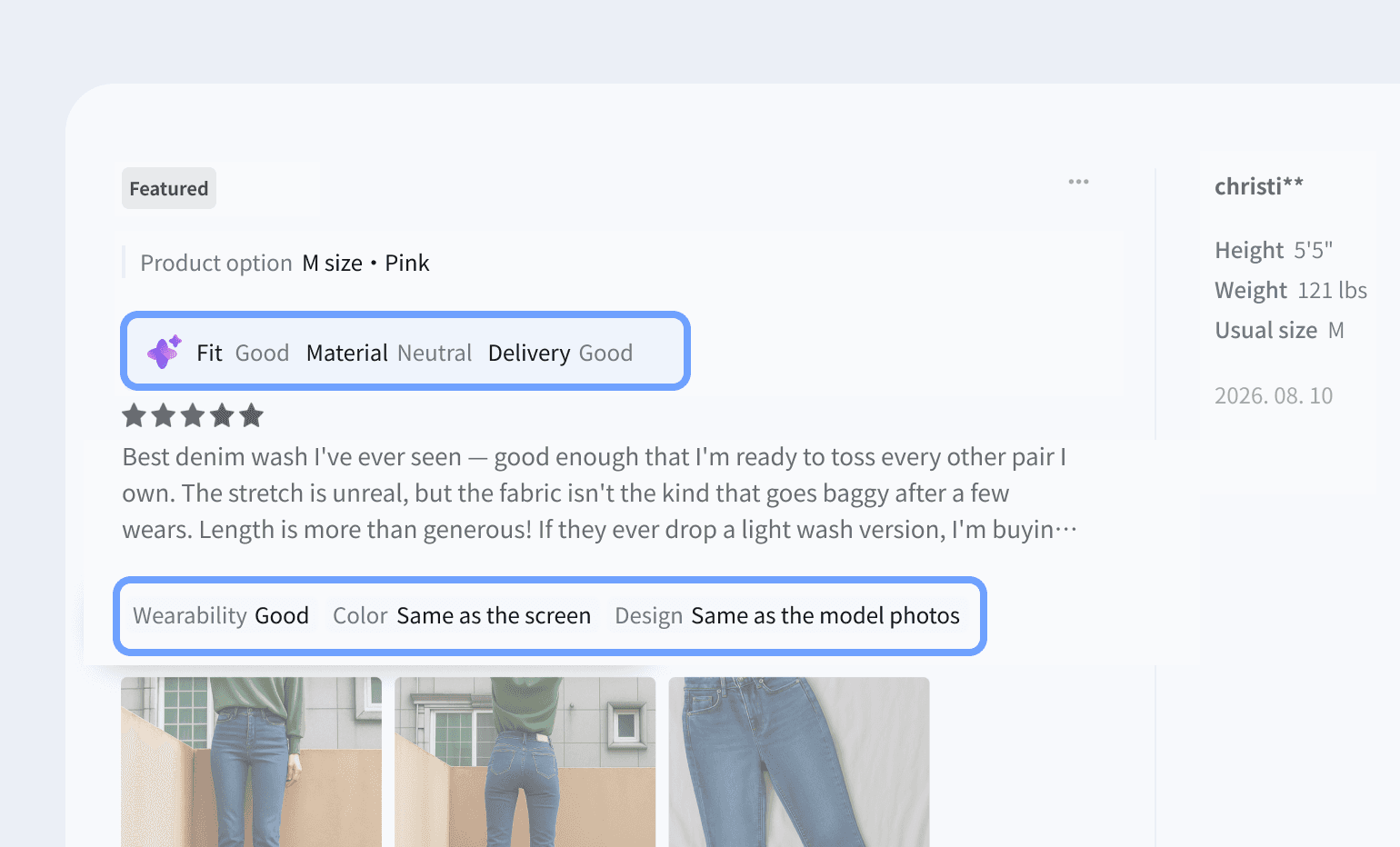
Shoppers no longer have to read a review to know what’s in it. AI-analyzed keywords appear above each review, and the rating tags the customer selected themselves appear below it.
Take a review like: “Cinching the waist tie gives it a really flattering silhouette, and the fabric has great stretch. Shipping took two weeks, though 😔” — AI condenses that into keywords such as
great fit,good fabric,slow shipping. The tags underneath come from the custom questions you’ve configured for your category (for example, Absorption**:** Fast or Finish**:** Lightweight for skincare), chosen by the customer at submission time.The result: shoppers catch a product’s key points fast, and comparing similar products in your catalog gets much easier.
📌 AI keyword filters: one tap to the reviews you want
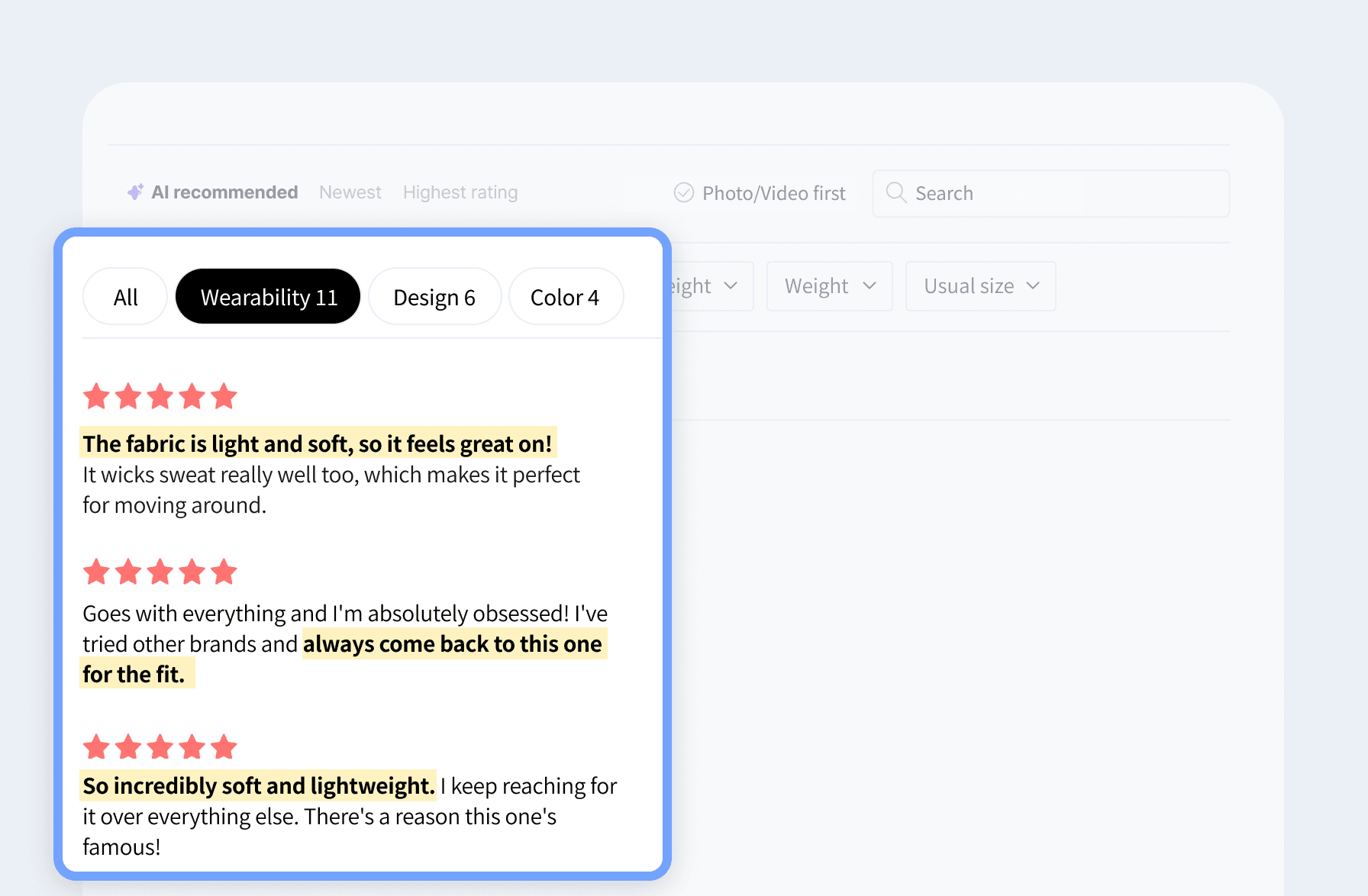
AI keywords now appear as tags at the top of the widget, not buried behind a dropdown. Frequently mentioned themes — fit, color, shipping — are filterable in a single tap.
A shopper curious about fit taps fit; the relevant reviews collect instantly, and the sentences containing that keyword are highlighted inside each review, so the answer is visible without scanning full paragraphs.
📌 AI Review Summary: the whole review pool, in one line
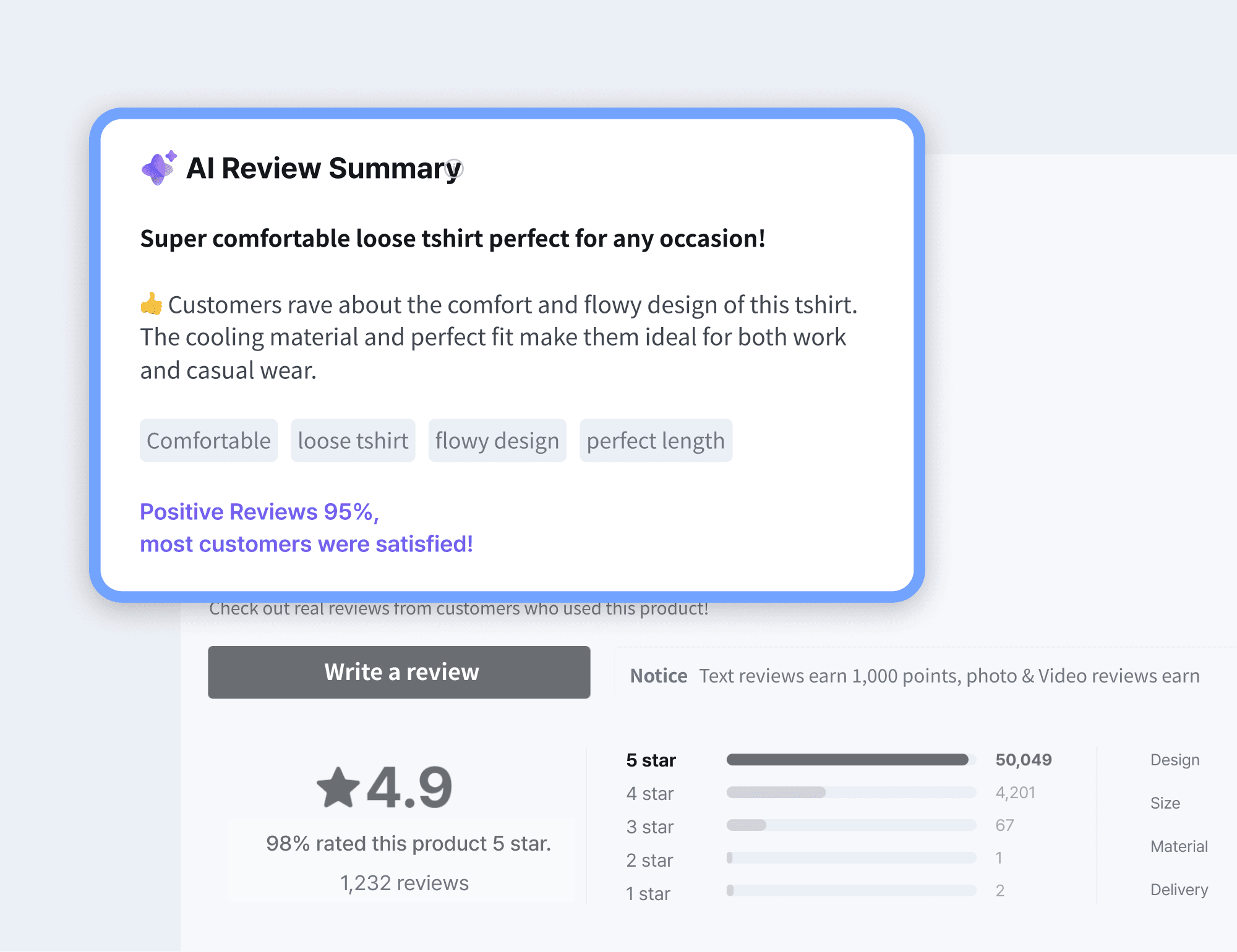
Plenty of reviews, none of the signal — a familiar problem. AI Review Summary analyzes every review on the product and returns a one-line takeaway, a positive/negative recap, the share of positive sentiment, and the keywords currently trending upward.
A shopper reads “Most reviewers praised the fit and fabric; true to size” and has what they need to decide, without opening a single individual review.
👉 Read the full AI Review Summary guide
3. Filters that let shoppers find their review
Volume alone doesn’t persuade. If a shopper can’t reach the review that answers their specific question, that review might as well not exist. This release adds new filter types and makes the existing ones more intuitive.
📌 Reviews by product option
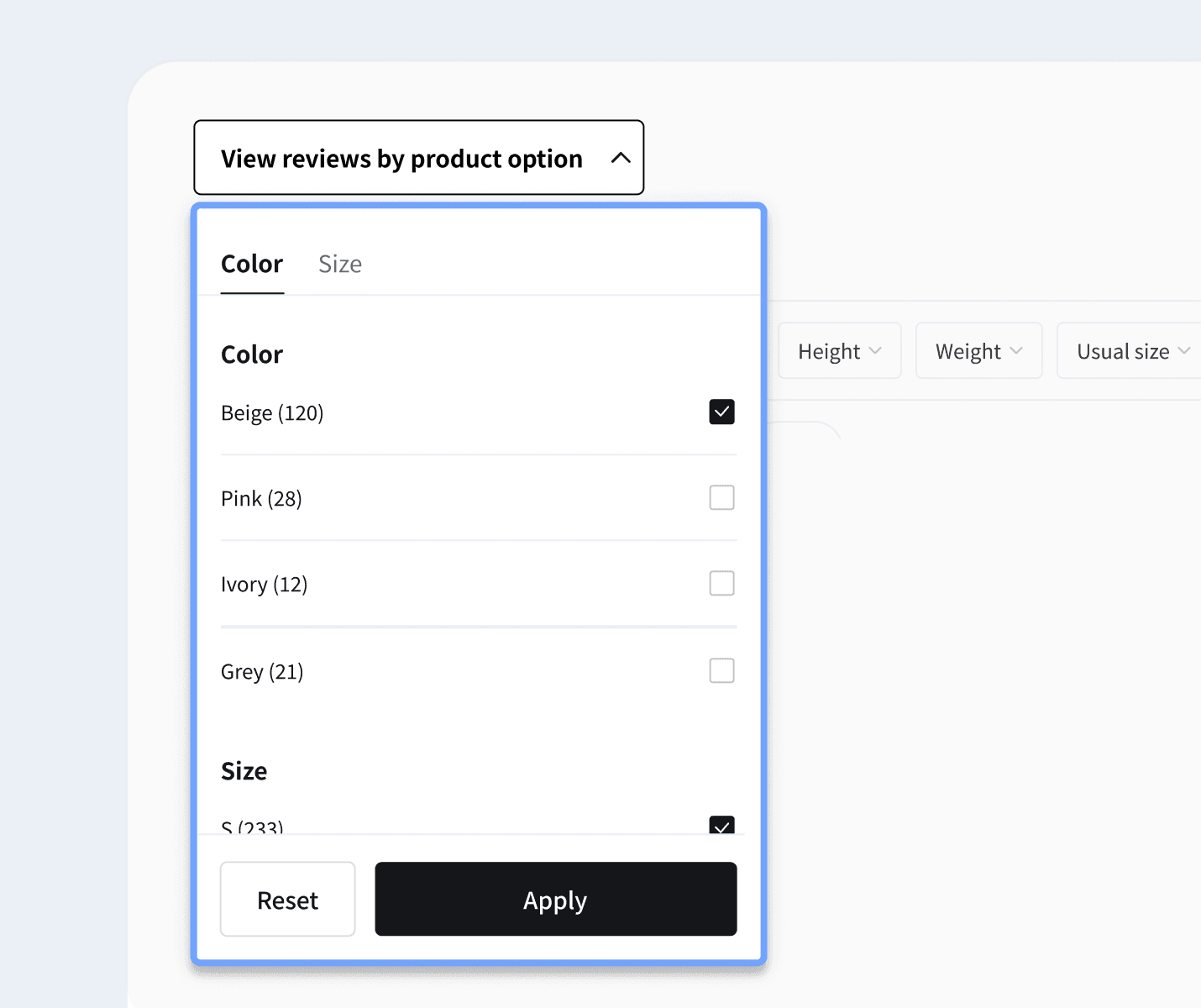
Ever wanted to see reviews for one specific color or size, and had to open every review to find them? The product options filter removes that step.
Satisfaction genuinely varies by variant — a white colorway might read as slightly sheer, for instance, while the same style in navy doesn’t. Filtering to something like Beige/S surfaces only the reviews from shoppers who bought that exact combination, which is a far more useful input to a purchase decision than an aggregate rating.
4. Show only what your store needs
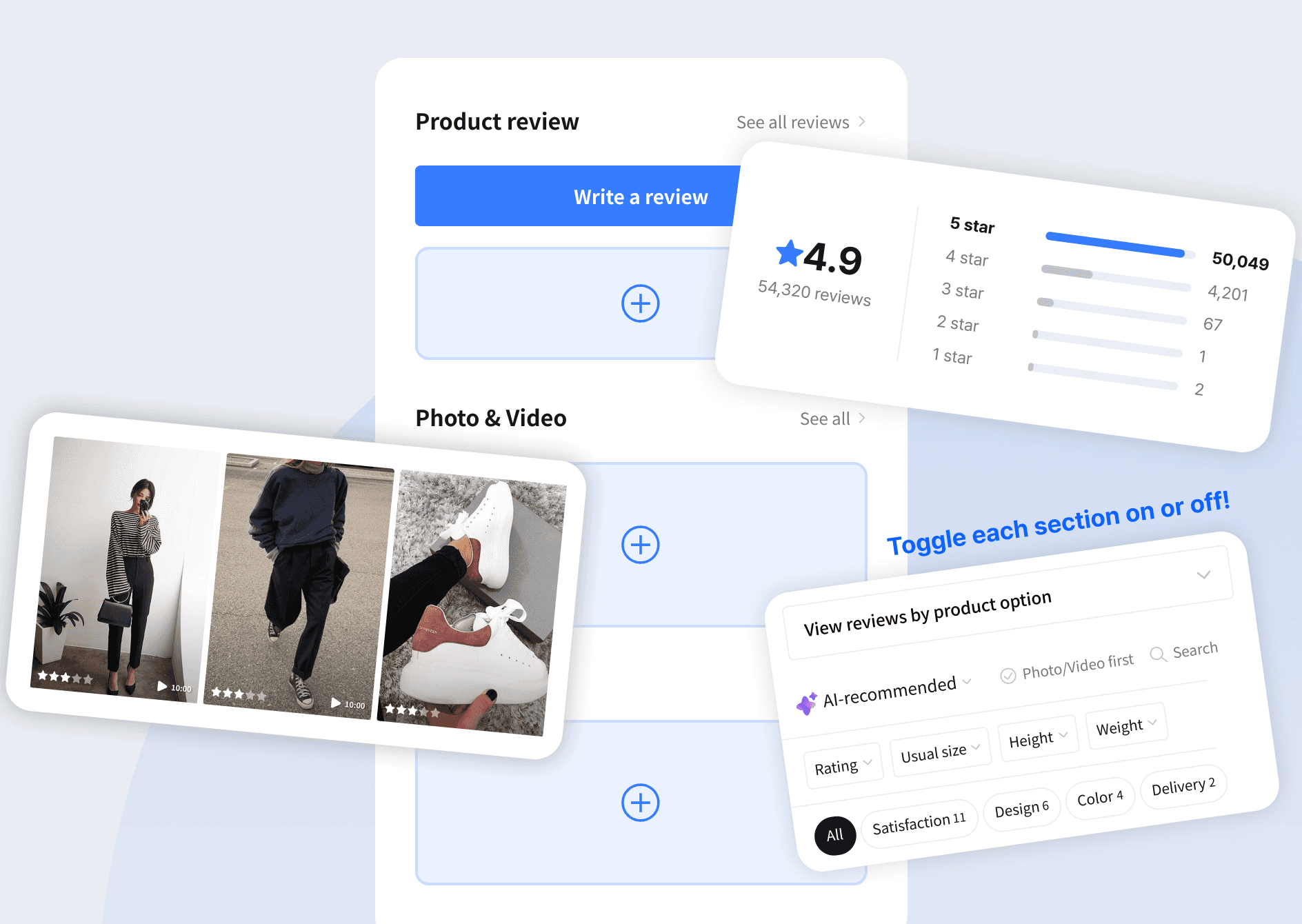
Every detail area of the Reviews Widget can be configured to match how your store actually operates. Each of the new features in this release ships with an individual on/off toggle: product options filter, AI keyword filter, ‘Photo/Video first’ button, review keyword search, and more — all controlled from the CREMA admin, with no theme editing.
If you have a deep review pool, lean into filters and search to make it navigable. If your store’s design language is minimal, expose only the elements you need and keep attention where you want it. Match the widget to your brand tone, your customers, and your category — and treat your reviews section as something you tune, not something you install once.
How to get the new Reviews Widget
The redesigned Reviews Widget is applied by default. Add CREMA to Shopify and it’s live from setup.
FAQ
What is CREMA’s Reviews Widget?
It’s CREMA’s flagship review display widget for Shopify. It collects every text, photo, and video review for a product into one place on your product detail page, and layers AI features — summary, sorting, keyword filters, keyword search — on top so shoppers can navigate the social proof you’ve already collected.
Does the Reviews Widget work on Shopify Online Store 2.0 themes?
Yes. CREMA widgets install as app blocks in the Shopify theme editor, so you can place and reposition the Reviews Widget without editing code.
Can shoppers filter Shopify reviews by product options?
Yes. The product options filter lets shoppers narrow reviews to a specific color, size, or option combination, so they only read feedback from customers who bought what they’re considering.
How does AI Recommended sorting decide which reviews come first?
It evaluates signals including review length, whether photos or videos are attached, and positive keyword density, then automatically surfaces the reviews most likely to support a purchase decision.
Can I turn individual features off?
Yes. Filters, the keyword search bar, the ‘Photo/Video first’ button, and the AI keyword filter each have their own on/off setting in the CREMA admin.
A shopper meeting the exact review they were looking for — that’s what filtering and AI are for. With the redesigned Reviews Widget, shoppers get to the information they need faster, and your store converts more of them. Try it on your Shopify store today.