Product News
AI Review Summary for Shopify: Turn Hundreds of Reviews Into a One-Glance Decision
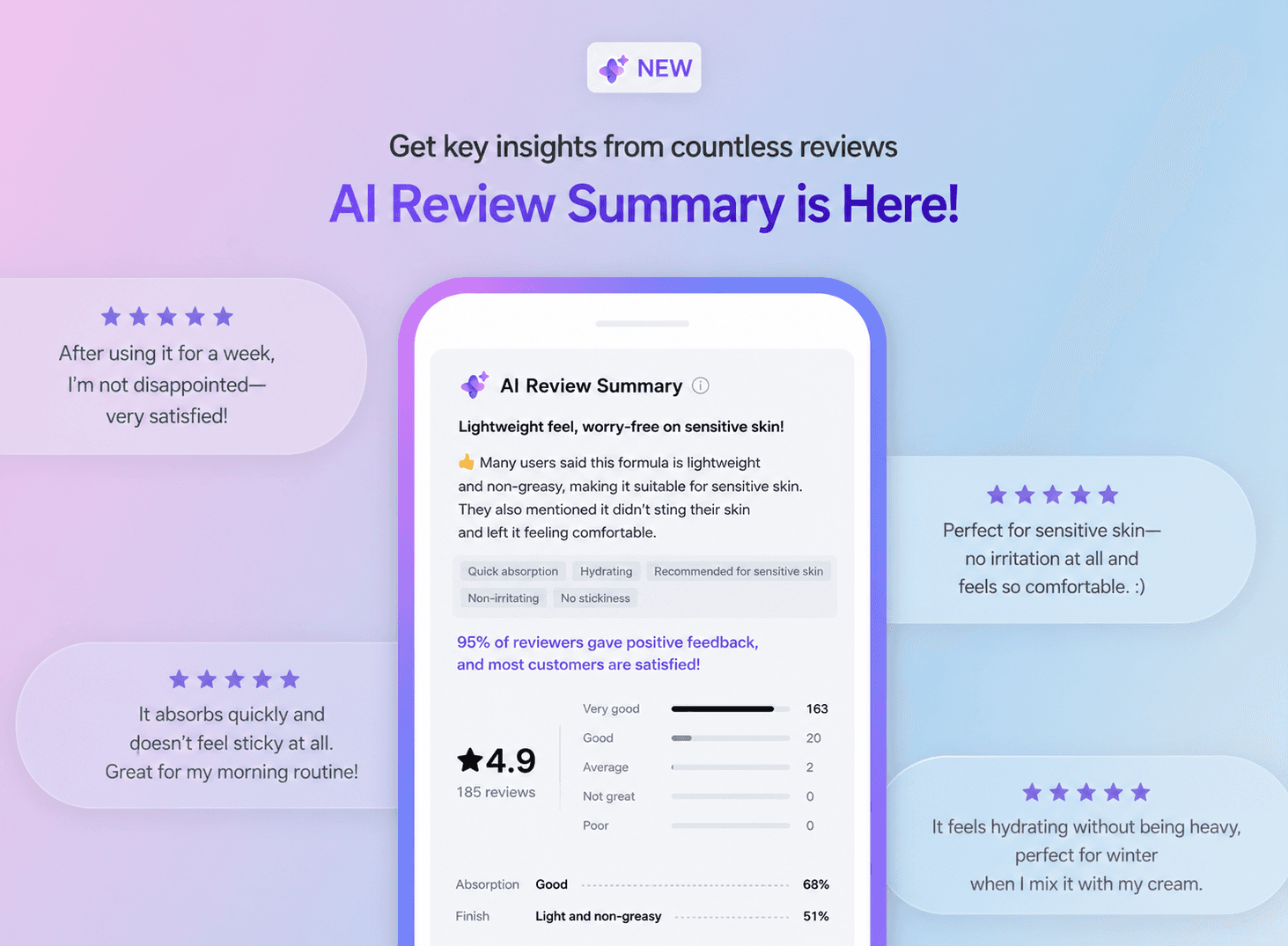
How CREMA Reviews uses generative AI to condense every product review on your Shopify store into a one-line takeaway, top customer keywords, and sentiment analysis — so shoppers can decide faster, and merchants can convert more.
✍🏻 Key takeaways
AI Review Summary uses generative AI to read every product review and surface a one-line summary, a positive/negative recap, the most-mentioned customer keywords, and sentiment analysis.
It appears at the top of CREMA's Reviews Widget on Shopify product detail pages, so shoppers grasp the consensus before scrolling through individual reviews.
McKinsey research shows that small improvements in a product's star rating can drive 30%–200% sales growth depending on the category — but only when shoppers can actually parse what reviewers are saying. AI summarization helps overcome review fatigue and capture that lift.
Setup takes two minutes inside the CREMA admin — no code, no theme edits.

What is AI Review Summary?
AI Review Summary is a generative-AI feature in CREMA Reviews that automatically analyzes every review on a product page and condenses the collective customer feedback into five at-a-glance components: a one-line summary, a positive review recap, a negative review recap, the most frequently mentioned keywords, and sentiment analysis. It is designed for Shopify merchants who have accumulated dozens, hundreds, or thousands of reviews per product and want to turn that volume into a fast, confident purchase decision for the next shopper.
Why AI Review Summary matters for Shopify stores in 2026
More reviews should mean more conversions — but only when shoppers can actually parse them. Three industry data points capture the tension AI Review Summary is built to solve:
Ratings and reviews drive growth. A McKinsey & Company analysis of hundreds of thousands of products across the 70 highest-selling online categories — over two years — found that small improvements in a product's star rating can drive 30%–200% sales growth depending on the category, and that climbing from three to four stars alone lifts sales by around 24%.
Shoppers always read reviews, but expectations are rising. BrightLocal's 2026 Local Consumer Review Survey reports 41% of consumers now "always" read reviews before purchase — a jump from 29% in the prior year — and 68% won't buy from a business rated below four stars.
Generative AI is becoming the new "reading" layer. The same BrightLocal 2026 study shows the share of consumers using ChatGPT and other generative AI tools for recommendations grew from 6% to 45% in one year, making AI-readable, well-structured review content increasingly important to surface in answers.
In other words: shoppers want the signal, not the noise — and the signal increasingly has to be machine-readable. AI Review Summary delivers both.
Where AI Review Summary appears on your Shopify product page
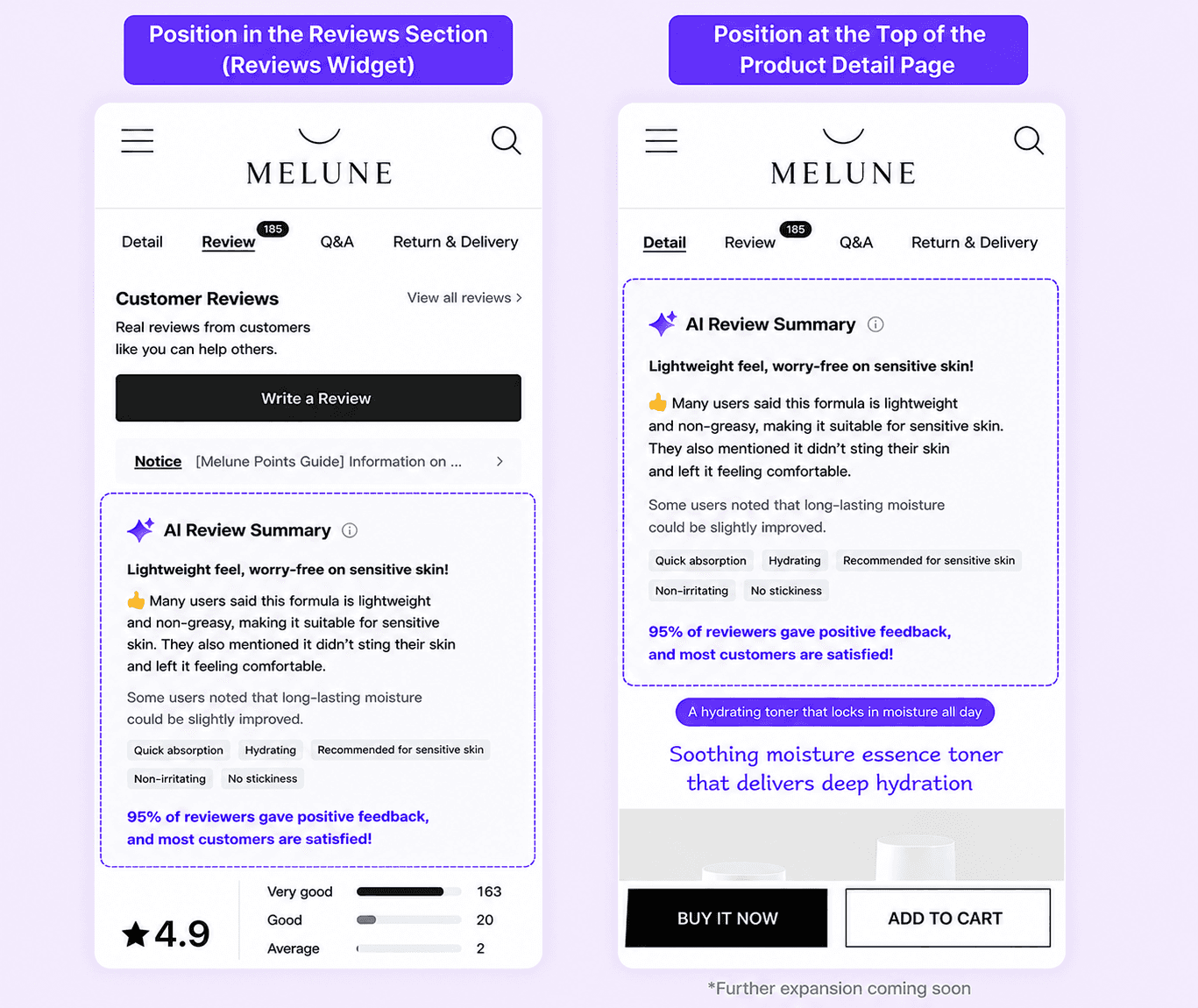
AI Review Summary is displayed at the top of CREMA's Reviews Widget, the widget that gathers every text, photo, and video review for a product into one place on your product detail page (PDP). Because the Reviews Widget sits in the spot Shopify shoppers look at first when they scroll to reviews, the summary becomes the first impression of social proof — before the shopper has read a single individual review.
※ We plan to expand placement so that AI Review Summary can also be surfaced near the top of the product detail page (above the fold) in a future release
✍🏻 What is the Reviews Widget?
CREMA's flagship widget on Shopify. It gathers all reviews for a product — text, photo, and video — and layers on AI features (summary, smart filters, keyword search) so shoppers can browse the social proof you've already collected, faster.
Inside an AI Review Summary: the 5 components
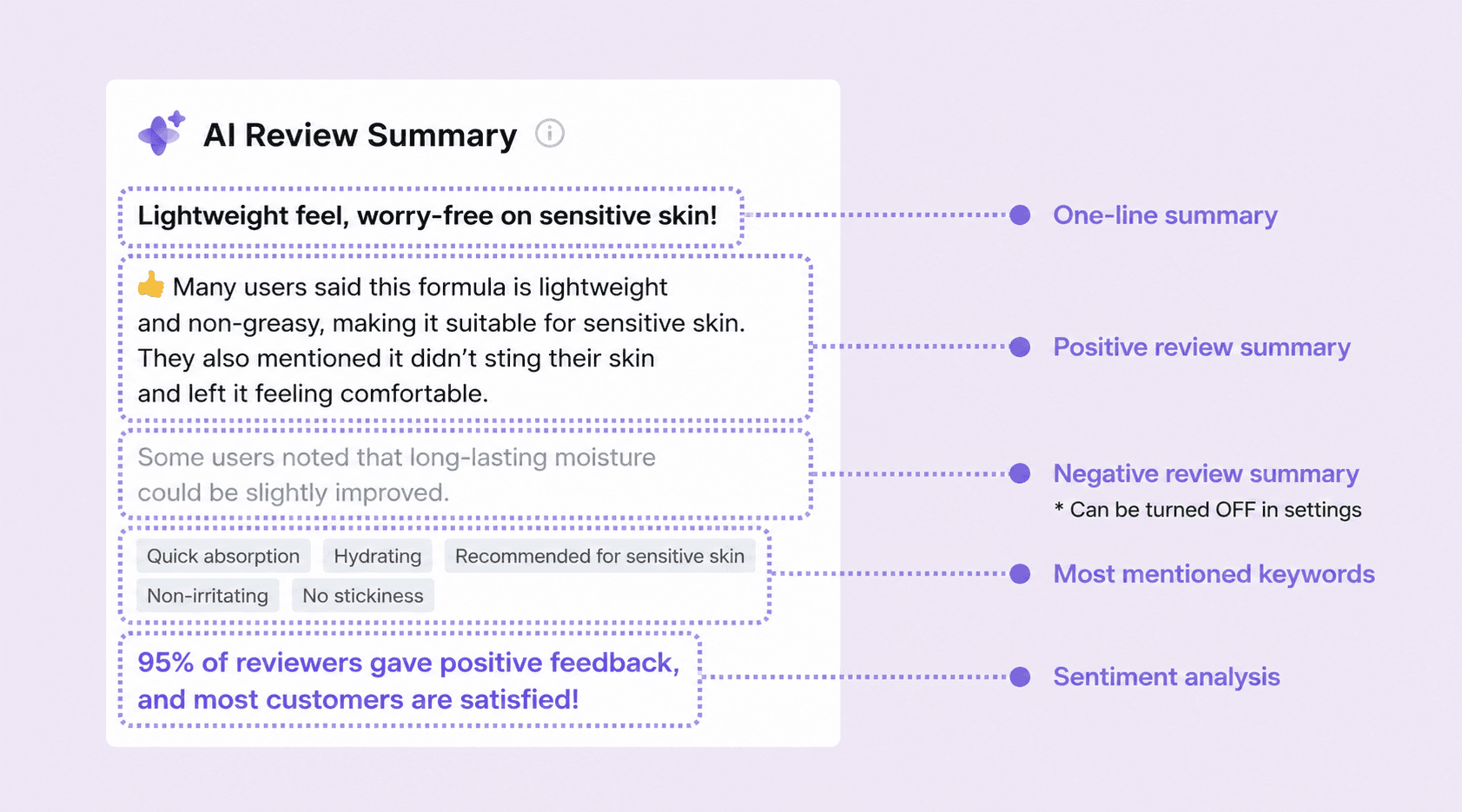
An AI Review Summary is organized into the five components below. They are designed so shoppers can quickly grasp the product's characteristics and overall reputation whether they go on to read individual reviews or not. By default, both the positive and negative review summaries are displayed together — but you can flexibly show or hide the negative review summary in your settings whenever it suits your store.
1) One-line summary
Distills the entire pool of reviews into a single sentence — for example, "Refreshing, lightweight hydrating toner that won't trigger breakouts." Shoppers understand the product's defining characteristic in the time it takes to read one line.
2) Positive review summary
Captures the points customers most commonly praise, in the customer's own voice — for example, "👍 Many reviewers noted that the lightweight, refreshing texture absorbs quickly and feels effortless on the skin."
3) Negative review summary
Conveys negative feedback in a soft, helpful tone — for example, "A few reviewers mentioned that the moisturizing power felt slightly less than expected." If fewer than 5% of the keywords across reviews are negative, the section instead displays a reassurance line such as "So far, the vast majority of reviews have been positive," maintaining trust. If no negative keywords are detected, the section is hidden automatically, and merchants can also choose to hide it entirely from settings.
💡 Why include a negative summary at all?
Consumer research has consistently shown that shoppers read mid-range ratings — typically in the 4.5–4.9 range — as more authentic and trustworthy than near-perfect 5.0 ratings. Trustist's review-psychology research, for example, finds that products rated around 4.9 often convert better than those rated 5.0. A balanced summary, surfaced honestly, can convert better than a wall of perfect praise.
4) Most frequently mentioned keywords
Up to five recent, high-frequency keywords are surfaced as tags — for example, quick absorption, hydrating, sensitive-skin friendly, not greasy, no stickiness. The result: shoppers can instantly see what fellow customers actually talk about, not just whether the rating is high.
5) Sentiment analysis (positive review %)
A clear percentage of positive reviews based on the entire pool — for example, "95% positive — most customers were satisfied," or "83% positive — many shoppers recommended it." One number, one sentence — and shoppers understand the overall satisfaction level intuitively.
How to enable AI Review Summary in CREMA admin
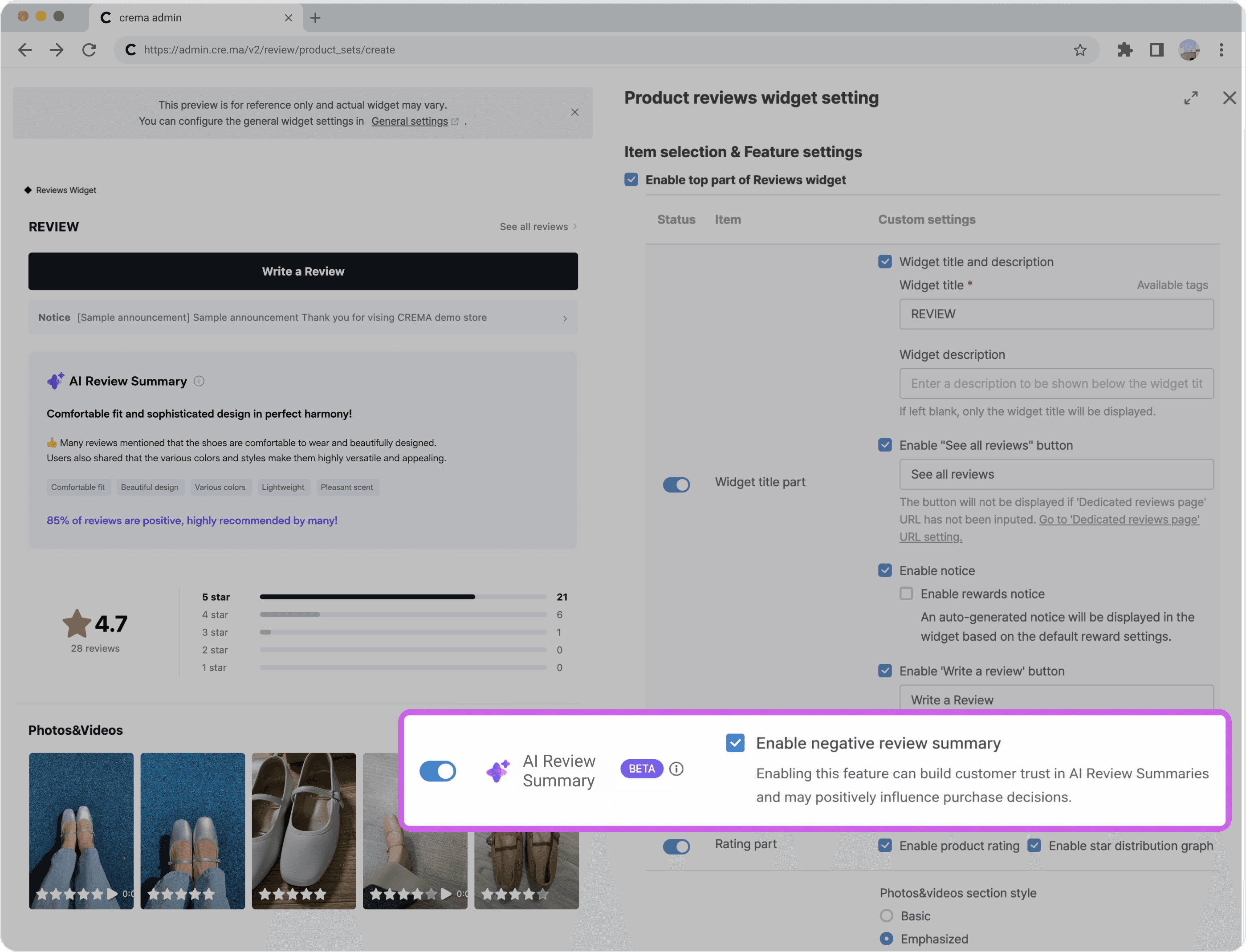
Two minutes inside the CREMA admin, no code:
In the CREMA admin, go to Reviews → Widget Settings.
In the widget list, find the Reviews-style widget and click Settings.
In the Item selection & Feature settings panel on the right, turn the AI Review Summary toggle on.
(Optional) Uncheck Enable negative review summary and confirm Disable in the popup to hide the negative recap from your storefront.
Summaries will not appear instantly after you flip the toggle. AI needs time to analyze each product's reviews and generate the summary, and summaries appear product by product as they become ready. Larger catalogs typically populate over the course of a day.
Use cases by category
AI Review Summary is category-agnostic, but the lift tends to be largest where shoppers ask the most questions before buying:
Beauty & skincare — shoppers want to know how a product behaves on their skin type. The keyword tags (e.g., "sensitive-skin friendly," "non-greasy") shortcut this judgment.
Apparel — sizing, fabric feel, and color accuracy dominate review chatter. The one-line summary and top keywords surface fit consensus quickly.
Electronics & gadgets — shoppers weigh trade-offs (battery, build quality, sound). A balanced positive/negative summary reduces decision fatigue.
Food, supplements, and wellness — taste, effect, and packaging concerns repeat across hundreds of reviews. Summary + sentiment % builds fast trust on high-consideration purchases.
Try AI Review Summary on your Shopify store
If you're already a CREMA Review’s customer, turn AI Review Summary on today from your admin and measure the lift on your highest-traffic product pages. If you're evaluating CREMA for your Shopify store, talk to our team — we'll walk you through pricing, setup, and what to expect on conversion in your category.