Product News
Zero reviews on your new launches or bundle products? Solve it with ‘Group Reviews’.

When you launch new products frequently, the same challenge keeps coming back: your newly registered SKUs have zero reviews. No matter how strong the product is, shoppers tend to hesitate when there’s no social proof to back it up. It’s especially frustrating when a new product is just a variant of an existing one — a different color or size — or when individual products are bundled into a set. Even though plenty of reviews are already piled up on the originals, the new SKU has to start from zero all over again.
That’s exactly what ‘Group Reviews’ is built for. It lets you display reviews from an existing product on your new or related products as well — so a fresh launch never starts at zero.

Table of contents
What is ‘Group Reviews’?
‘Group Reviews’ is a feature that connects related products so their reviews can be displayed together. Think of products that differ only in color, pre- and post-renewal versions of the same item, or 1+1 bundle products — any case where the products deliver a similar purchase experience.
Related products aren’t always related in the same way, though. That’s why CREMA Review lets you choose between One-way sync, Two-way sync, and Grouping sync based on each product’s characteristics. The diagram below summarizes how the three sync methods differ and when each one shines.
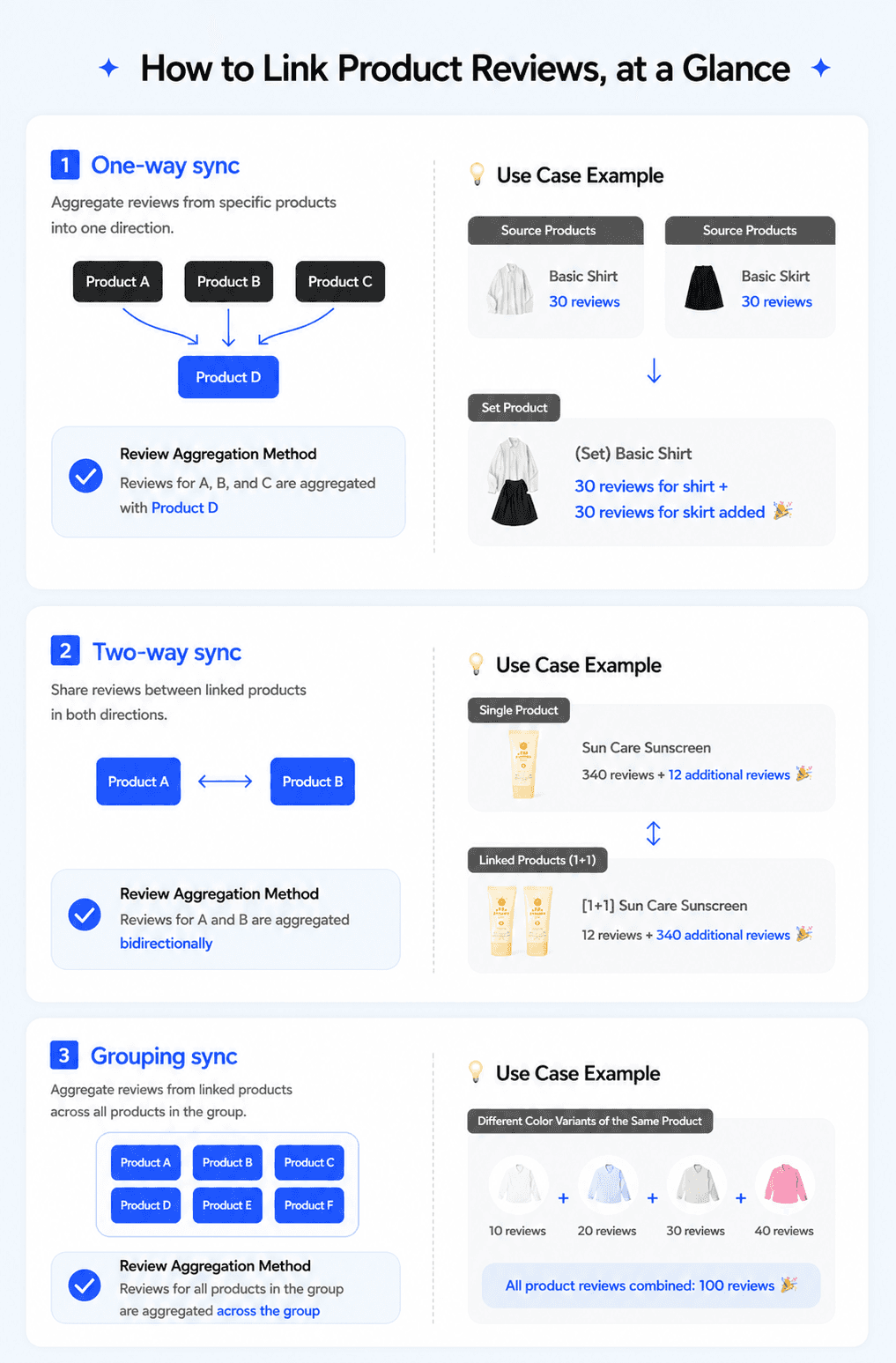
In short, Group Reviews naturally connects already-accumulated reviews to related products, so shoppers see more social proof when they’re deciding what to buy. From a customer’s perspective, being able to see how others have used a similar product — and what they liked about it — is far more helpful than landing on a product with no reviews at all.
Where can I set up review sync using Group Reviews?
In CREMA Reviews, all sync settings live on a single page: [Group reviews]. To create a sync, enter a name to identify the review sync, pick the sync method that matches the relationship between your products, and add the products you want to connect. Because the scope and direction of how reviews appear depends on the method you pick, choosing the one that fits your operational goals matters.
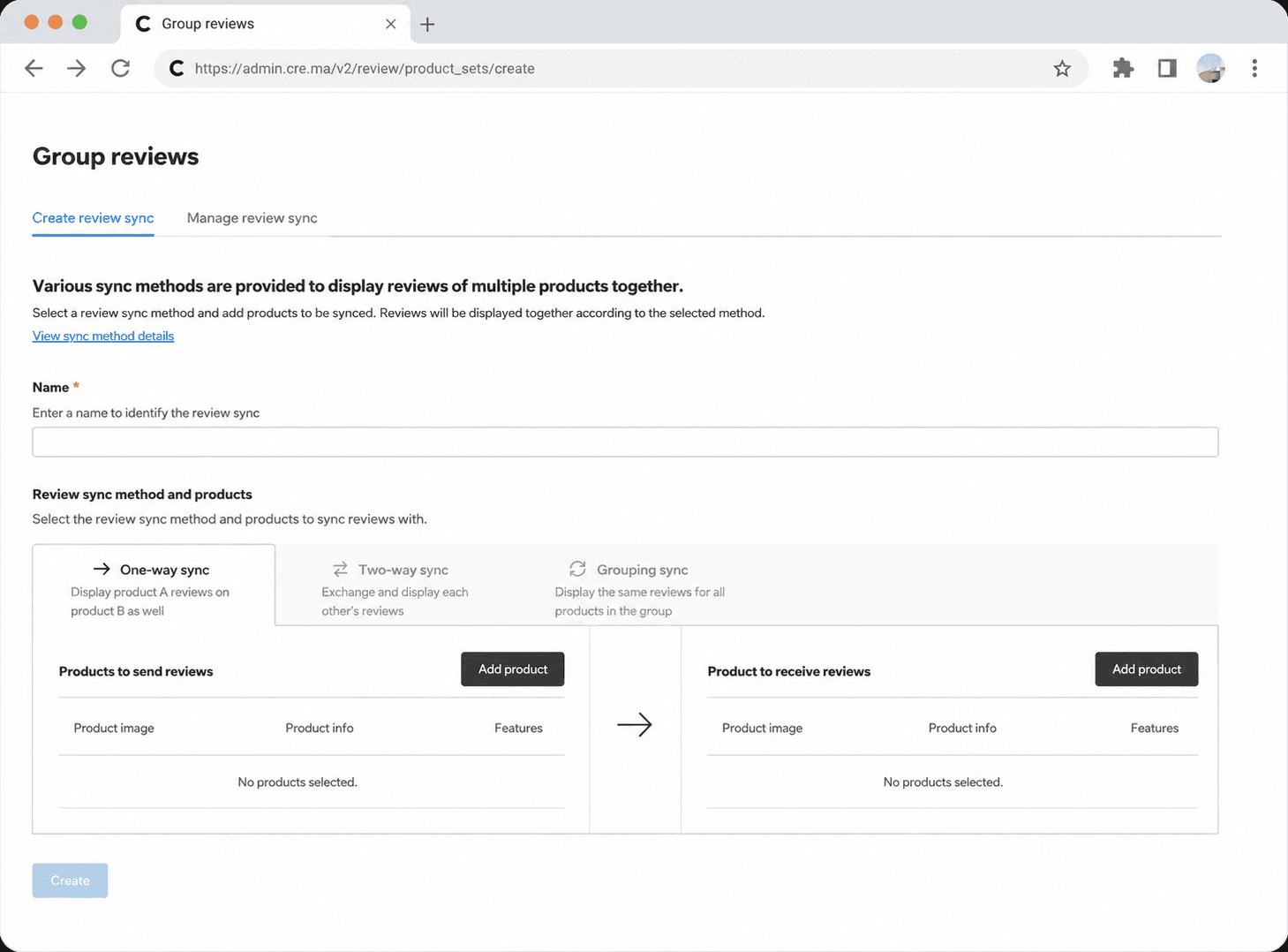
From this screen, you can immediately choose between One-way sync, Two-way sync, and Grouping sync. Everything — selecting the method, adding products, and saving — happens in one flow, which makes it easy to sync reviews across many products efficiently.
⚙ Setup path CREMA [Admin] → [Review] → within Review management, [Group reviews] → Create review sync
✔️ Go directly to the setup page: https://admin.cre.ma/v2/review/product_sets/create
➡️ One-way sync: when you want to show one product’s reviews on another
With One-way sync, reviews from Product A are displayed on Product B — but not the other way around. Reviews flow in a single direction, so Product B’s reviews are not shown on Product A. This is a good fit when you want to carry over the reviews of an older product to a new launch, but don’t need the new product’s reviews to flow back to the original.
↔️ Two-way sync: when you want related products to share reviews both ways
With Two-way sync, Product A and Product B share their reviews with each other. Reviews on A also appear on B, and reviews on B also appear on A. It’s a strong fit for products that deliver a similar purchase experience or are commonly compared side-by-side.
🧩 Grouping sync: when you want to bundle multiple option products under one set of reviews
Grouping sync lets you bundle multiple products in the same product family into a single group and display their reviews together. Once grouped, you no longer need to set up a sync individually each time you add a similar product, so repetitive configuration disappears. It’s especially useful for brands that run color or size options as separate product pages.
How to manage your review syncs
On the [Manage review sync] tab of the [Group reviews] page, you can see at a glance which products are connected — and through which sync method.
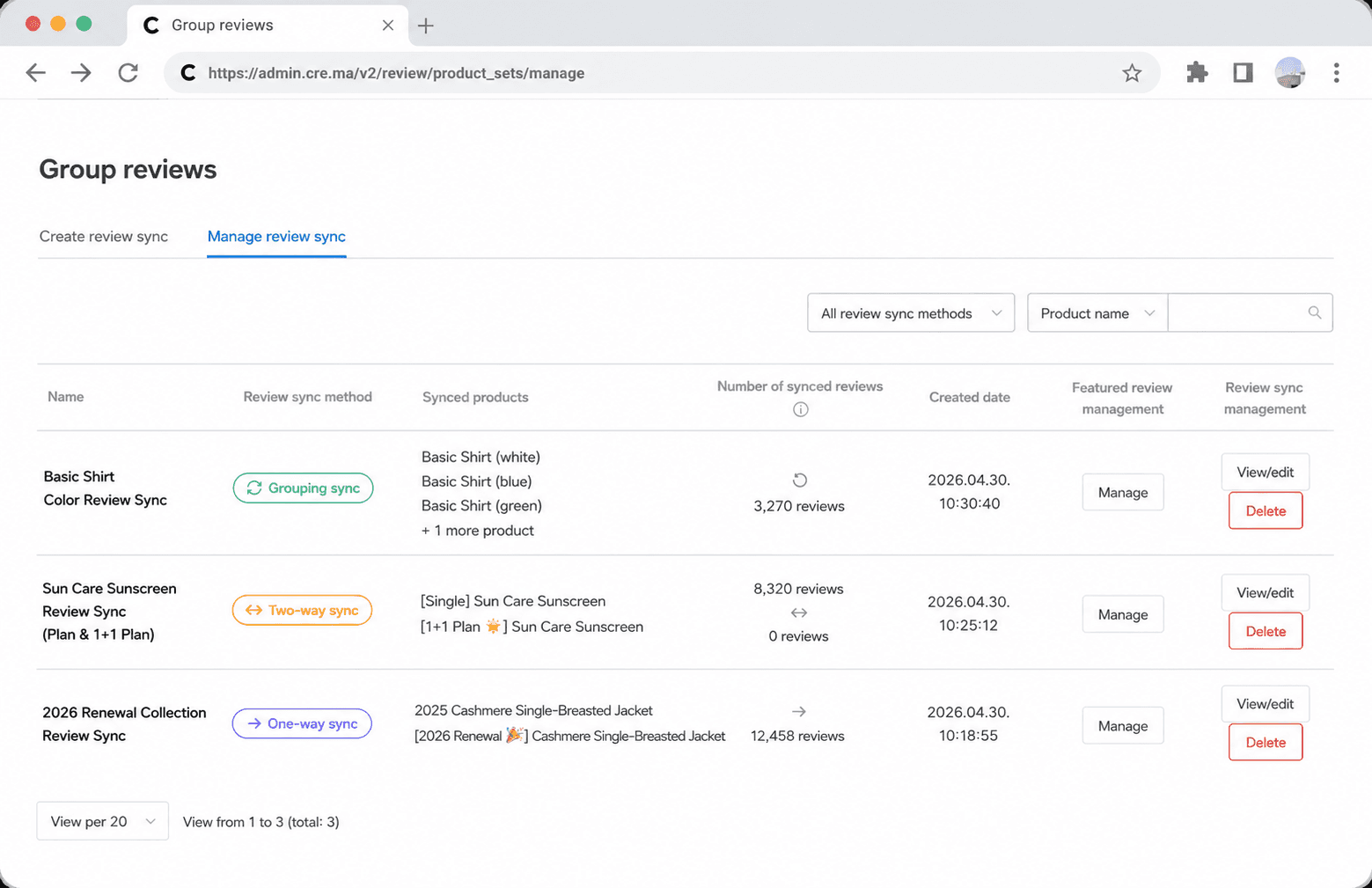
From this screen, you can filter the list by review sync method or product name, and for each entry you can View/edit, Delete, or jump straight into Featured review management. Setup and management aren’t separated into different pages, so your operational flow stays uninterrupted.
⚙ Setup path CREMA [Admin] → [Review] → within Review management, [Group reviews] → Manage review sync
✔️ Go directly to the management page: https://admin.cre.ma/v2/review/product_sets/manage
Easy management of featured reviews
Clicking Featured review management in the list opens a dedicated screen where you can directly manage the featured reviews displayed for that synced set. From here, you can check the featured review list, their display order, and review status — and reorder or remove from featured reviews whenever needed.
For example, if you run bundle products, you can pick the reviews that best showcase the bundle composition or usage experience and pin them as featured reviews at the top of the list. In other words, the [Group reviews] page isn’t only about connecting reviews — it’s also where you decide which reviews get the spotlight.
FAQ
Q. Which products should I sync together? A good rule of thumb: sync products that customers would naturally treat as a similar purchase. Common examples include products that differ only in color or size, pre- and post-renewal versions of the same item, single items vs. 1+1 bundle items, or bundle products vs. their individual components — anything customers tend to compare or perceive as alike.
Q. Will my existing reviews disappear if I turn on review sync? No. Existing reviews stay intact — they’re simply also displayed on the connected products, based on the sync method you selected. The original reviews are not deleted or modified, so you can use this feature with peace of mind.
Q. Can I use review sync and review copy at the same time? Yes. That said, applying both review sync and review copy to the same product can cause reviews to appear duplicated on the product detail page. When using both features together, please double-check that their display scopes don’t overlap.
Q. Can a single product belong to multiple review syncs at the same time? Yes. Note that products included in a Grouping sync have some restrictions, and management can get more complex as sync relationships pile up. We recommend defining clear operational guidelines upfront and reviewing your sync setup periodically.
Group Reviews naturally connects your existing reviews to related products, helping shoppers make confident purchase decisions. It’s especially useful for brands that launch new products frequently or run option and bundle products side by side. Put your already-trusted reviews to work, and start building up reviews on new launches faster.